Beating Rising Material Costs: A Japanese Crafter’s Guide to Profit Calculation and Cost Control
yassy
Crafters!
Hello, everyone! It’s Yassy from Crafters! (・∀・)
As someone who loves making, browsing, and buying all kinds of handmade crafts, today I want to share my passion for an incredibly powerful promotional tool.
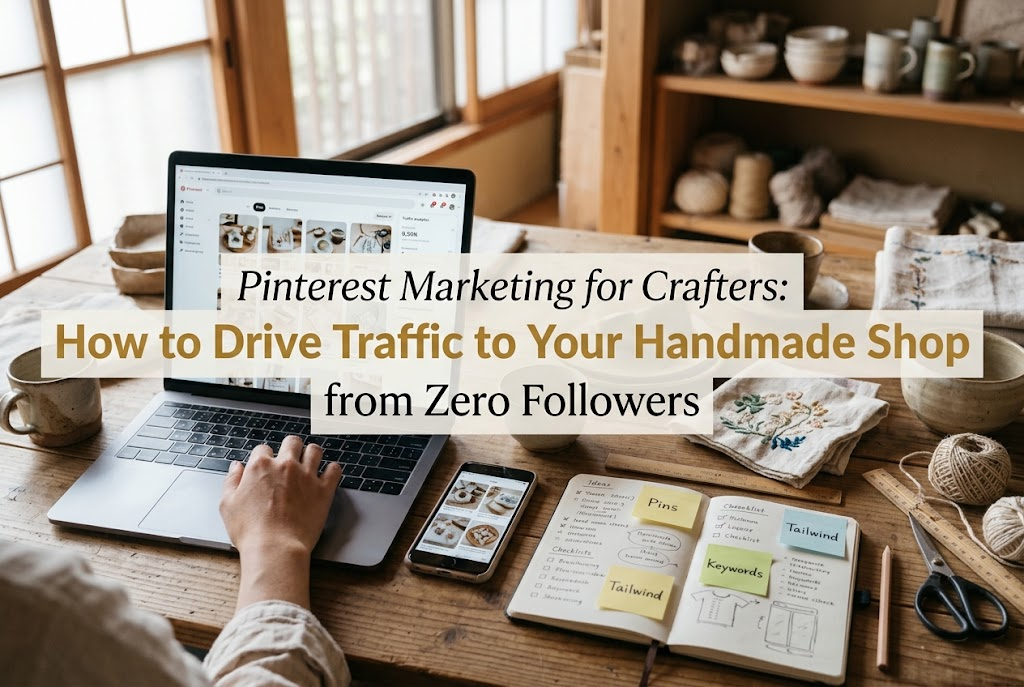
Many creators struggle with getting their handmade pieces seen by a broader audience and driving traffic to their online shops. If you rely solely on typical social media platforms, you inevitably hit a wall: unless you constantly gain new followers, your creations get buried in the feed.
That is why I highly recommend Pinterest. Pinterest has an entirely different nature from standard social networks, making it exceptionally well-suited for handmade crafts.
When used correctly, even a brand-new account with zero followers can put your craft photos directly in front of people around the world who are actively searching for items just like yours.
In this guide, I will walk you through the exact steps and techniques to effectively showcase your handmade creations on Pinterest and drive genuine shoppers to your shop or website.
When starting out on Pinterest, many people make one major misunderstanding: they treat it like an interactive social network such as Instagram or X (formerly Twitter).
If you approach Pinterest with that mindset, you simply will not see results. Pinterest is not social media; it is a visual search engine.
Users do not open Pinterest to leave likes or comments on someone's posts. They use it to search for things they want to buy, things they want to make, or designs for inspiration, saving those images for their future self.
Understanding this fundamental difference is the first and most critical step to finding success on Pinterest.
On standard social media, posts are consumed the moment they appear on a timeline and vanish beneath newer content within a few days. Unless you keep acquiring new followers, your work will not reach new audiences.
In contrast, because Pinterest is a search engine, the images you post (Pins) continue to appear in search results months—or even a full year—down the line. Once posted, a Pin becomes an asset that consistently guides potential buyers to your shop over a long period.
Furthermore, on Pinterest, your follower count does not dictate how often your content is shown. Visibility is determined by Pinterest's visual recognition algorithm and keyword matching. With compelling visuals and the right settings, an account with zero followers can easily generate tens of thousands of impressions.
If you are feeling exhausted from trying to build a following on conventional social platforms, leveraging Pinterest’s search-driven mechanism to connect directly with interested shoppers is an ideal solution.
When using Pinterest to promote handmade work, always start with a business account. Converting from a personal account to a business account is completely free.
A business account unlocks detailed analytics, allowing you to see exactly how many times each Pin was viewed and which images generated outbound clicks to your shop. Operating on intuition alone without reviewing data will not lead to steady sales growth.
Once your account is set up, optimize your profile thoroughly. For your profile picture, use your brand logo or a high-quality photo of one of your signature handmade pieces.
For your display name, make it an absolute rule to include keywords that instantly clarify what you make, not just your creator name. For example, a format like "[Your Brand Name] | Resin Jewelry & Botanical Decor" ensures you are easily discovered via search.
In your bio, write a concise summary describing the items you create, your artistic focus, and a direct invitation to visit your shop.
The third essential step is claiming your website or online store domain. Register your URL—whether it is a marketplace storefront on platforms like minne or Creema (popular handmade marketplaces in Japan), or your own standalone website—and claim ownership.
Claiming your domain signals to the algorithm that your Pins are authentic content coming directly from the official source. This boosts your standing in search rankings and related visual feeds, making it a step you should never skip.
Once your account setup is complete, create "Boards" to categorize and save your images. Think of boards as online bookmark folders.
A common beginner mistake is creating a single broad board named "My Work" or "Handmade" and dumping every image into it. This is not search-friendly and significantly limits your visibility.
Board titles should reflect specific search terms that users actually type into the search bar. Use titles that clearly communicate the genre, materials, or occasion—such as "Dainty Freshwater Pearl Earrings," "Nordic-Style Embroidered Pouches," or "Autumn Resin Hair Accessories."
Personally, I recommend creating at least five to ten specialized boards based on the different item types your brand offers. The more clearly categorized your boards are, the better Pinterest understands your brand's niche.
Be sure to fill in the board description in the board edit settings as well. Write natural sentences that incorporate keywords related to the items in that collection.
A well-crafted board description can also help your board appear in external search engines like Google, opening up even wider pathways for discovery.
Additionally, saving (repinning) a few high-quality Pins from other creators that align with your brand's visual aesthetic can be very effective. This elevates the overall theme of your board and reinforces the niche authority of your account.
Pinterest is an entirely visual platform. No matter how wonderful your handmade craft is, people will not click if the image is not captivating.
There is a definitive rule for creating images that perform well on Pinterest: always use vertical images with a 2:3 aspect ratio.
The recommended dimension is 1000 pixels by 1500 pixels. Avoid posting square photos (1:1), which are common on Instagram, or wide horizontal shots.
The vast majority of Pinterest users browse on mobile devices. Vertical images take up significantly more screen space, making them much more likely to catch the eye of someone scrolling through a feed.
If you post horizontal or square images, they will appear compressed between taller vertical Pins, causing them to lose their visual impact.
Right from the photography stage, compose your shots vertically. Prepare a mix of full-product shots, close-ups that show fine craft details, and in-use shots—such as jewelry being worn or decor styled in a room.
Bright, clean photos taken in natural daylight perform best on Pinterest. Cluttered household backgrounds or harsh, dark shadows drastically reduce click-through rates and should be avoided.
Aim for lighting and composition that immediately evoke a sense of charm and quality at first glance.
While posting clean photos alone works, adding well-placed text overlays to your images can significantly boost engagement.
Pins with text allow viewers to understand what the item is in an instant, greatly increasing the chances of saves and clicks compared to standalone photos.
However, crowding the image with excessive text has the opposite effect. Keep your on-image text concise and compelling, ideally within a brief phrase of a few impactful words.
Instead of merely writing "Handmade Earrings," choose phrasing that resonates directly with your target audience, such as "Hypoallergenic | Dainty Branch Drop Earrings" or "Elegant Resin Jewelry for Everyday Office Wear."
Pay close attention to typography. Choose a font that matches your brand aesthetic, and if the text blends into the background, add a semi-transparent band or shape behind it to ensure effortless legibility.
The best placement for text is in the negative space at the top or bottom of the image. Never place text directly over the focal point of your handmade piece.
For a single product, I recommend creating three to five different image variations using different photo angles or text designs. Presenting the same piece with different angles and taglines allows you to reach completely different search audiences.
Reviewing which design drove the most clicks later on will give you clear insights into what your audience responds to most.
Once your images are ready, configure the title and description on the Pin upload screen. This is the heart of on-platform SEO (Search Engine Optimization).
In the title, combine the item name with high-demand search keywords. Aim for a concise title that places the most important search terms near the beginning.
A classic structure is: Product Name + Aesthetic Style + Intended Use. For example: "Mimosa Embroidered Frame | Natural Botanical Home Decor & Spring Gifts."
Next, write a descriptive, natural paragraph of 100 to 200 characters for the Pin description. Smoothly incorporate the craft’s distinct features, materials, colors, recommended uses, and terms your ideal buyers are likely searching for.
For example: "This handmade hair accessory features genuine pressed flowers set in crystal-clear resin. The delicate blend of soft pink and gold pairs beautifully with spring outfits. A thoughtful handcrafted gift for birthdays and special occasions."
Never paste a random list of disconnected keywords, as algorithms can interpret this as spam. The golden rule is to weave keywords naturally into readable, informative sentences.
Note that hashtags (#) carry very little weight on Pinterest today. Instead of spending time gathering hashtags, focus entirely on enriching your descriptive text.
No matter how many views your Pins receive, they will not result in sales if viewers cannot find their way to your checkout page. Always add a destination link to every Pin you upload.
There is a major mistake that beginners frequently make here: linking every single Pin back to their shop’s general homepage.
Imagine a shopper falling in love with a specific item on Pinterest and clicking the link, only to land on an online storefront with dozens of items. Having to search through an entire catalog creates unnecessary friction, and most will simply abandon the site.
Always link each Pin directly to the specific product listing page for that exact item. Maintaining the buyer's excitement from the visual to the checkout screen is essential for achieving higher conversion rates.
If a direct listing page does not exist or if you are aiming to build brand depth, link directly to a specific blog post or curated feature page highlighting that piece.
Additionally, pay close attention to page speed and mobile usability on your shop or website. If your site takes too long to load or breaks on mobile screens, you are letting valuable traffic slip away.
Always preview your destination pages on a smartphone yourself, operating on the assumption that nearly all Pinterest visitors will arrive on mobile devices.
Achieving solid results on Pinterest requires consistent posting rather than uploading dozens of images at once and abandoning the platform.
To build account authority, steadily posting one to three Pins per day is the most effective rhythm. However, designing and posting images manually every single day can easily become overwhelming for busy artisans.
This is where Pinterest’s built-in scheduling tool becomes indispensable. With a free business account, you can schedule Pins for specific future dates and times.
My recommended workflow is setting aside time once a week—say, every Sunday—to schedule seven days' worth of content (around 7 to 14 Pins) all at once.
By establishing this system, your account remains active and consistent without interrupting your day-to-day crafting, packaging, and shipping duties.
Furthermore, it is entirely acceptable to create fresh Pins for past bestsellers using alternative photo angles or new graphic templates. The beauty of Pinterest is that you can continually revitalize past creations in new formats.
By building a manageable, automated routine, you can maintain your marketing efforts over the long haul without burning out.
Once your business account has been running for a while, make it a habit to review your Pinterest Analytics regularly.
Checking the numbers helps bridge the gap between what you assume is working and how users are actually responding. Pay closest attention to these three core metrics:
If your impressions are low, your titles and descriptions may not match what users are searching for, or your images might not follow the vertical 2:3 format.
If a Pin has many saves but few outbound clicks, viewers are admiring the image without feeling a reason to visit your shop. You can improve this by adding clear calls-to-action on the image, such as "Visit shop for details" or "Tap to view all color variations."
Conversely, when you spot a Pin with high impressions, saves, and clicks, you have found your winning formula.
Analyze that Pin thoroughly: examine the photography angle, color palette, text placement, and keywords used. Then, replicate that layout and style across your other handmade creations.
Identifying what resonates and creating similar, high-performing Pins is the fastest route to exponential traffic growth.
To keep your account healthy and avoid penalties or suspensions, there are several bad practices you must avoid.
First, never use low-resolution, blurry photos, and never use copyrighted images that do not belong to you. Re-uploading another creator’s photos without permission is strictly unacceptable. Blurry or dimly lit photos will also be flagged as low quality by the algorithm and hidden from search results.
Second, avoid burst-posting large volumes of Pins within a short window. Posting dozens of Pins in a single minute mimics bot behavior and significantly raises the risk of your account being flagged or suspended as spam. Always spread your posts out across the day using the scheduling tool.
Third, never set destination links that have no relation to the image content. For instance, linking an image of handmade earrings to a clothing page or an unrelated promotional site is misleading.
This frustrates users and can lead to your Pins being reported for poor user experience, potentially causing your entire domain to be blocked by Pinterest.
Ensure your image, title, description, and destination page align seamlessly. Posting genuine, high-quality Pins that fulfill user expectations is the only sustainable way to build a trusted presence.
Once you are comfortable managing your Pinterest workflow, consider integrating it with your other channels, such as Instagram or your personal website, for cross-platform promotion.
For example, vertical photos or short videos (like Instagram Reels) shot during your making process can be repurposed directly as video Pins on Pinterest.
Video Pins stand out remarkably in a feed filled mostly with static images. Short clips showing jewelry swaying in movement, facets catching natural light, or behind-the-scenes glimpses of your workbench often generate higher engagement than static photos alone.
Additionally, if you maintain your own blog or website, install a Pinterest "Save" button on your site’s images. This allows visitors who love your work to instantly pin items to their personal boards while reading.
Each time a visitor saves your image, that Pin becomes visible to their followers and appears across Pinterest's search results, multiplying your reach exponentially without extra work on your part.
Creating a setup where both your own efforts and your visitors' actions circulate your work across the web is the ultimate goal of organic digital marketing.
By repurposing existing media smartly, you can achieve maximum visibility with minimal extra effort.
In this guide, we explored the complete process of using Pinterest to showcase handmade items and channel meaningful traffic to your shop.
Pinterest frees you from the pressure of daily social chit-chat, letting you compete purely on the visual appeal of your craft and well-chosen search keywords—making it one of the best tools available for creators.
Pins do not expire. They remain online as lasting digital assets, quietly presenting your craft to the world 24 hours a day, 365 days a year.
At first, it is natural to feel uncertain if numbers take time to climb, as search algorithms need a brief period to index and evaluate your content. Do not rush. Focus on creating quality vertical photos, writing clear titles and descriptions, and scheduling your Pins consistently.
A few months from now, you will be thrilled to see people discovering your handmade pieces through Pinterest and arriving at your shop as genuine supporters.
Let’s continue sharing the creations we make with love and care to the people who are truly looking for them!
If you found this guide helpful, sharing it with your fellow makers would mean the world to me. See you in the next article! This was Yassy from Crafters!
For example, if you are looking for articles about mizuhiki, try searching for "mizuhiki"; if you are interested in tools, try keywords like "nippers" or "pliers."